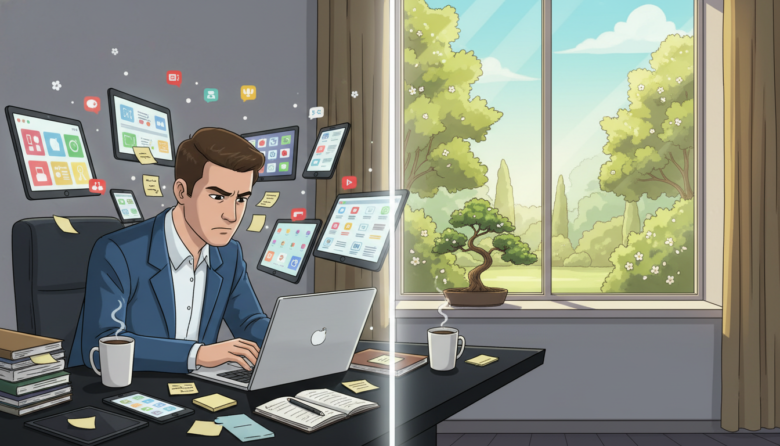
Have you ever felt mentally drained after jumping between different tasks? This experience has a name: context switching. The term comes from computer science, where systems save their current state before handling new requests.
Our brains work in a similar way. When you shift from one type of work to another, your mind needs time to adjust. This mental reload process costs energy and resources. For professionals who face constant interruptions, these transitions add up quickly.
Research reveals a surprising fact. A single unplanned task change can consume up to 20% of your cognitive capacity. Those “quick questions” from colleagues aren’t so quick when you consider the mental toll.
The good news? You don’t need complex systems or strict schedules. This guide shows practical ways to protect your focus. We’ll explore smart strategies that fit your existing workflow.
You’ll learn to identify common triggers and build protective habits. The goal isn’t perfection but meaningful progress toward better productivity.
Understanding the Hidden Costs of Context Switching
The term ‘context switching’ might sound technical, but its effects on your workday are intensely personal. While it originates from computer science, the human impact is far more significant than just a system process.
Origins and Impact on Developer Productivity
For professionals like developers, constant context switching can severely lower productivity. Research by Dr. Gloria Mark reveals a startling fact. It takes an average of over 23 minutes to fully regain focus after a single interruption.
Imagine the cumulative effect of multiple daily disruptions. A significant number of productive hours are lost just trying to get back on track. This makes completing complex tasks much harder.
Cognitive Drain and Attention Residue
Each switch between tasks requires mental energy. Your brain must disengage from one context and load another. This switching process creates a cognitive drain.
Sophie Leroy’s research identifies “attention residue.” This is when thoughts about a previous job linger while you try to start a new one. Your brain doesn’t just let go, making deep focus difficult.
The consequences are clear. Interrupted work takes twice as long and contains twice as many errors. For developers, this impact on code quality is a major concern.
Understanding these hidden costs is the first step. It helps justify protecting your focus time from unnecessary context switching. This leads to better productivity and higher-quality work.
Identifying Triggers and Workplace Distractions
The modern workplace is filled with subtle traps that constantly redirect your attention. Understanding these triggers helps you protect your valuable focus time.
Start by tracking your daily interruptions for a few days. You’ll discover patterns that disrupt your work flow.
Common Interruptions in the Modern Office
Physical distractions account for many unwanted switching moments. Colleagues stopping by for “quick questions” break your concentration.
Open office layouts amplify these interruptions. Unexpected meeting requests also fragment your schedule.
Digital Distractions and Notification Overload
Digital tools create constant interruptions. Slack messages and email notifications pull you away from important tasks.
The average professional faces over 31 distractions daily. This constant context shifting makes deep work challenging.
Identify whether switches are active or passive. Active changes happen when you choose to multitask. Passive switching occurs when external alerts interrupt your flow.
Reducing context switching in development
For software engineers, achieving a state of deep concentration is where true innovation happens. This section explores why protecting this focus is critical for technical teams.
Minimizing interruptions allows for higher quality output and more meaningful progress on complex projects.
The Value of Deep Work and Flow State
Deep work describes periods of intense, uninterrupted focus. For developers, this is essential for solving tough problems.
Entering a flow state feels like being “in the zone.” Your productivity soars, and ideas connect smoothly. This level of immersion is the wellspring of impactful work.
Constant disruptions are the primary enemy of this precious flow. They shatter the complex mental models needed for coding.
Examining the Financial and Time Costs
Frequent context switching creates engineering friction across the whole team. This slows down the entire development pipeline.
New features take more time to release. Recovering from system failures also requires more time. The financial impact of these delays adds up quickly.
Teams often gravitate toward short, easy tasks instead of important, complex work. This happens when the environment feels too disruptive for deep engagement.
When developers lack confidence they can finish a major task, innovation suffers. Protecting focused time is an investment in team productivity and morale.
Mastering Calendar Management and Time Blocking
Your calendar is more than a schedule; it’s your first line of defense against a scattered workday. By planning your tasks and reserving time for them, you create a structure that minimizes disruptive shifts. This proactive approach optimizes your mental energy.
Scheduling Dedicated Focus Blocks
Start by creating focus blocks on your calendar. These are reserved slots for specific work without distractions. Treat these blocks as important appointments you cannot miss.
Many professionals use the Pomodoro Technique within these blocks. Work for 25 minutes, then take a five-minute break. This rhythm helps maintain concentration over longer hours.
Implementing Thematic and No-Meeting Days
Group similar activities using thematic days. For example, designate one day for all your meetings. This bundles interruptions, leaving other days clear for deep work.
With the average professional attending over 25 meetings weekly, protecting focus time is crucial. Advocate for team-wide “no-meeting” days. This gives everyone large, uninterrupted time blocks.
Defend your scheduled focus time. Politely decline new meeting invites that conflict with these essential hours. Communicate the value of your protected blocks to colleagues.
Prioritization Techniques to Limit Multitasking
Clear priorities are the ultimate antidote to the productivity drain of constant task-hopping. When you know exactly what deserves your attention, you can channel your energy effectively. This clarity is your best defense against the urge to juggle multiple items at once.
Using the Eisenhower Matrix to Rank Tasks
The Eisenhower Matrix is a powerful tool for sorting your responsibilities. It divides your work into four simple categories based on urgency and importance. This method forces you to make conscious decisions about each task.
Urgent and important tasks get your immediate focus. Everything else is either scheduled for later, delegated, or removed from your list entirely. This framework brings instant order to a chaotic day.
Force-Ranking Priorities for Clear Focus
Another effective approach is force-ranking. You literally assign a number to every item on your list. This makes it impossible to treat all tasks as equally critical. You commit to tackling number one before even considering number two.
Research shows that true multitasking is a myth for most people. Only about 2.5% of the population can do it well. For the rest of us, trying to handle multiple tasks at once can slash productivity by up to 40%. Focusing on one task at a time is simply more efficient.
By setting clear priorities, you protect your mental energy. You give your full attention to your most important project, leading to higher quality results in less time.
Building Protective Habits for Sustained Flow
Small, consistent actions can build a fortress around your focus. They protect it from the chaos of the workday. Lasting change comes from these tiny, daily routines.
James Clear, author of Atomic Habits, explains this well. He says, “You do not rise to the level of your goals. You fall to the level of your systems.” Your daily habits are that system.
Establishing Atomic Habits for Developers
An atomic habit is a simple, easy-to-do practice. When repeated, it creates powerful compound growth. These small wins add up to major improvements in your productivity.
For development teams, specific habits can safeguard your flow state. The goal is to make protective behaviors automatic.
Minimizing Task Switching with Daily Routines
Build these four key habits into your day to help you stay focused.
- Finish one task before starting another. This prevents your mind from juggling multiple incomplete tasks. It allows for deeper engagement with each piece of work.
- Be mindful of your switches. Notice when you change focus. Tracking these moments helps you understand personal triggers. You can then find areas for improvement.
- Declutter your digital space. Remove distracting apps from your main screens. Aggressively reduce notifications. A clean digital environment supports better focus.
- Take intentional breaks. Pause between tasks to recharge. These micro-breaks prevent mental fatigue. They make necessary transitions smoother, helping you stay focused for longer times.
Integrating these habits creates a rhythm for your day. It supports sustained flow and higher-quality output on all your tasks.
Leveraging Tools, Automation, and Clear Communication
Your digital tools should be allies in your quest for focus, not sources of endless distraction. The key is to configure them to support your workflow, not disrupt it. This involves smarter use of platforms like Slack and email.
Thoughtful communication habits protect your entire team‘s concentration. This is especially powerful for remote teams using asynchronous methods.
Optimizing Slack, Email, and Notifications
Start by batching your communication checks. Designate specific time blocks for reading email and Slack messages. Try 15 minutes in the morning, at lunch, and before wrapping up your day.
Sync your Slack status with your calendar. This automatically sets you to “Do Not Disturb” during focus time or meetings. Colleagues will know you are busy without you needing to tell them.
Review your notifications critically. Turn off non-essential alerts to minimize interruptions. Create dedicated channels for different request types to keep messages organized.
Streamlining Meetings and Automated Workflows
Make every meeting count with a clear agenda sent in advance. Record sessions for teammates who cannot attend. For simple updates, use a shared document instead of calling a live discussion.
Automation is a powerful ally. Use tools to create workflows that handle repetitive tasks. This eliminates manual handoffs that cause context switching.
Integrating DevOps and Self-Service Tools
Self-service tools empower developers. They can provision resources without filing tickets or waiting for other teams. This streamlines the process for everyone.
Integrate your most-used apps into a cohesive ecosystem. This prevents constant switching between platforms. A unified process helps developers stay in their flow state.
These strategies turn your tools from distractions into defenders of your focus.
Enhancing Developer Experience Through Process Improvements
What if your daily workflow could protect your focus instead of constantly breaking it? Smart process design creates this reality for engineering teams. The right systems minimize disruptive shifts between tasks.
Fragile systems create emergency situations that pull developers away from planned work. These interruptions destroy productivity and morale across the entire team.
Implementing Best Practices in DevOps
Strong DevOps practices prevent constant firefighting. Automated testing catches issues before they reach production. Comprehensive monitoring helps teams resolve problems quickly.
Slow, manual workflows create waiting periods that tempt multitasking. Self-service tools eliminate handoffs between teams. Streamlined code reviews prevent attention fragmentation.
The DevOps Handbook reminds us that improving daily work matters more than the work itself. Investing in better processes pays dividends in sustained focus and higher-quality output.
Long-Term Strategies for Sustainable Productivity
Looking beyond daily tactics reveals the true cost of constant interruptions. The real impact accumulates over weeks and months, affecting both output and morale.
Investing in Developer Wellbeing and Environment
Studies from UCI Irvine show a clear link. Frequent interruptions lead to higher stress and mental fatigue for your team. This daily drain can make developers dread their work.
Sustainable productivity means protecting cognitive energy, not just logging more hours. Smart organizations create environments that support deep concentration. This investment pays off in retention and quality.
Reasonable expectations and protected focus time are key. They prevent the exhaustion that comes from too many context switches.
Balancing Urgency with Deep Work Sessions
Urgent requests are a reality. The goal is to handle them without destroying everyone’s focus. Create clear team agreements on interruptions.
Define when it’s okay to introduce a new task immediately. Also, set times when requests should wait. This structure makes switching intentional, not chaotic.
Balance is crucial. Protect large blocks for deep work on complex projects. This ensures your team can achieve meaningful progress without constant disruption. The right balance supports long-term productivity for all developers.
Bringing It All Together for Lasting Efficiency
Building sustainable efficiency requires more than just individual tactics—it demands a holistic approach to how we structure our work. The strategies we’ve explored work best when combined into a cohesive system that supports your natural workflow.
Calendar management with focus blocks, smart prioritization, protective habits, and optimized tool usage create powerful synergy. Batching similar tasks together and scheduling specific times to check email reduces cognitive switching costs dramatically.
Teams that embrace these practices see remarkable benefits. Happier developers produce higher-quality work with faster delivery times. The cumulative effect of minimizing unnecessary task changes transforms team productivity.
Start by identifying your personal triggers for context switching. Implement one or two strategies that fit your current workflow. Remember that staying focused is about designing supportive environments, not relying on willpower alone.
Even small improvements in managing your attention can lead to significant gains in both output and job satisfaction over time.

Spencer Blake is a developer and technical writer focused on advanced workflows, AI-driven development, and the tools that actually make a difference in a programmer’s daily routine. He created Tips News to share the kind of knowledge that senior developers use every day but rarely gets taught anywhere. When he’s not writing, he’s probably automating something that shouldn’t be done manually.